Multi-platform app
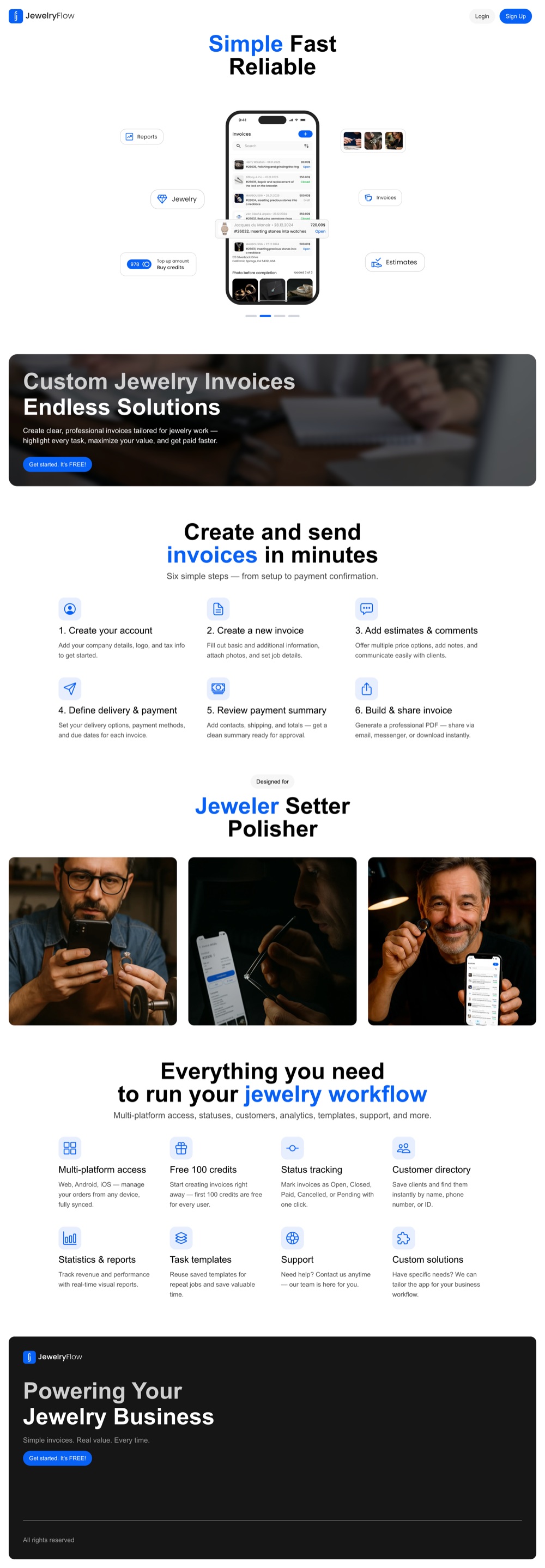
One synced product across web, iOS and Android — start an invoice on the bench, finish it at the counter, no re-entry.
Case study · Mobile & web app
JewelryFlow lets jewelry stores, jewelers, setters and polishers create clear, professional invoices in minutes — on web, iOS and Android. Zen in Tech designed and built the product end to end, from the app itself to the marketing site.
Also: Google Play ↗ · App Store ↗
The designs
Scroll inside the frame to explore the whole page.
The brief
Jewelry work does not invoice like anything else. A single job can span a jeweler, a setter and a polisher; pricing is per-task; photos and stone details matter; and the same customer comes back again and again. Generic invoicing tools force that reality into the wrong shape, so most of the trade still runs on notes, spreadsheets and messenger.
JewelryFlow needed to feel purpose-built for the bench and the counter: fast enough to use between jobs, professional enough to send to a client, and available on whatever device a jeweler happens to have in hand. That meant one synced product across web, iOS and Android — not three disconnected apps.
What we delivered
One synced product across web, iOS and Android — start an invoice on the bench, finish it at the counter, no re-entry.
From company setup to a shareable invoice: basics and job details, photos, estimates and comments, delivery and payment, a clean review summary.
Every invoice marked Open, Closed, Paid, Cancelled or Pending in one tap — so nothing gets lost between the bench and getting paid.
Save clients and find them instantly by name, phone number or ID — the repeat business the jewelry trade runs on.
Reusable task templates for recurring jobs, and a professional PDF shared via email, messenger or download.
Real-time revenue and performance reports built in, so a store can see how the workshop is actually doing.
Results
A cloud invoicing app, live on web, iOS and Android.
Company details, job basics, photos, estimates and comments — a six-step flow from setup to send.
Mark invoices Open, Closed, Paid, Cancelled or Pending, and find any client by name, phone or ID.
Save recurring jobs as templates so the next invoice takes seconds, not minutes.
Real-time revenue and performance reports show how the workshop is actually doing.
Our approach
We designed for the bench first. Every flow is built to be used in the seconds between jobs — big tap targets, photos front and center, and a six-step path that a jeweler can finish one-handed. The same design system carries across web, iOS and Android so the product feels like one tool, not three.
Under the hood it is one cloud backend feeding every platform, so invoices, customers and templates stay in sync wherever they are opened. New users get 100 free credits to start creating right away — value before commitment.
Services on this project
Stack & tools
JewelryFlow is a cloud invoicing app Zen in Tech designed and built end to end for the jewelry trade, live on web, iOS and Android. The figures below describe the product itself; the app is available at jewelryflow.app with 100 free credits for every new user.
FAQ
Web, iOS and Android — one synced product. You can start an invoice on one device and finish it on another without re-entering anything.
It is built for jewelry work specifically: per-task pricing, photos and job details, a customer directory for repeat clients, reusable templates, and invoice statuses that match how a workshop actually operates.
At jewelryflow.app — every new user starts with 100 free credits, no card required.
Book a free consultation — we’ll map the fastest path for your project and a clear price.
Knowledge hub
Auto repair and dealership websites that convert: online booking, fast mobile pages, reviews, and service pages that turn visitors into booked jobs.
Read · 4 min →App DevelopmentHow to vet and hire React Native developers — skills to test, red flags, rates, and engagement models. A practical hiring guide from Zen in Tech.
Read · 8 min →App DevelopmentReact Native vs Flutter compared on performance, cost, team availability, and UI — with a clear recommendation for each app type. Read the 2026 breakdown.
Read · 8 min →